


GTA: Liberty City Stories
4.04.68K Reviews
App Specs
- Version
- 2.4.379
- Updated On
- License
- Free
- Downloads
- 10,000,000+
- Developer
- Rockstar Games
- Categories
- Adventure
- Platform
- Android, iOS
Screenshots
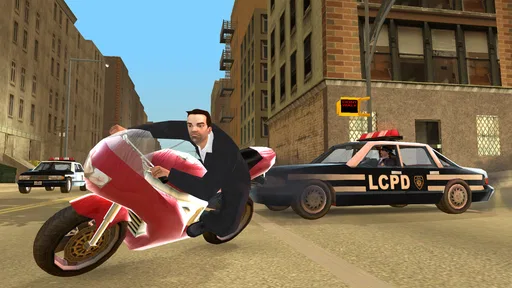
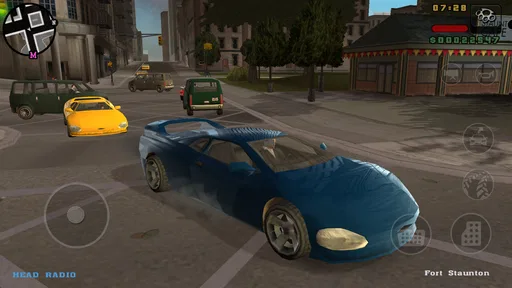
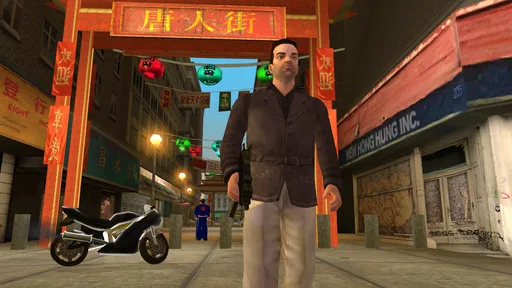
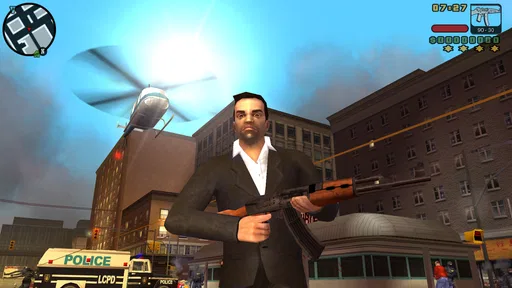
 Analysis by AppCompare
GTA: Liberty City Stories is the kind of adventure game I would recommend to someone who wants a substantial single-player experience rather than a quick mobile distraction. It brings Rockstar Games’ crime drama to a compact format, but it still expects you to spend time learning the city, understanding missions, and getting comfortable with movement and driving. My first impression was that it feels closer to a traditional console-style game than to the usual short-session titles on a phone.
The game is free to download, carries a Mature 17+ age rating, and has reached more than ten million installs. Its average rating sits at 4.0 from roughly 127 thousand ratings, which matches my overall view: there is a lot to enjoy, but the experience is not effortless for every player. The current version is 2.4.379, and it requires Android 9 or later. In-app purchases are listed at $6.99 per item, so I would check the purchase flow carefully before handing the phone to a younger family member.
What the Liberty City experience feels like
The setting is the main attraction. Liberty City is not simply a backdrop between missions; it is the space where the game’s rhythm develops. I spent time moving through streets, learning which routes felt safer or faster, and gradually recognizing areas that had initially seemed interchangeable. That familiarity matters because missions often become easier once I stopped treating the map as decoration and started treating it as a place I needed to read.
The adventure structure gives the game a clear sense of progress. Rather than dropping me into an endless stream of unrelated activities, it encouraged me to follow the story and use each mission to understand the characters, locations, and tone. The writing is deliberately mature and the world is built around crime, violence, and adult themes, so the age rating is important rather than decorative. This is not a suitable choice for children simply because it is available on a mobile device.
On a phone, the biggest adjustment is control. Driving, turning, aiming, and moving through crowded situations all compete for screen space. I found that the game became much more comfortable after I stopped trying to rush through every action. Short, deliberate inputs worked better than frantic tapping, especially when a mission required both navigation and quick reactions.
The most useful mindset is to treat the opening hours as a learning period, not as a test of speed. Liberty City Stories rewards patience with the controls. If you expect the immediate simplicity of an arcade game, the first sessions may feel awkward. If you accept that the city and interface take time to learn, the same friction becomes manageable.
Who will enjoy it most
I think the game is best for players who like story-led adventures, open environments, and the feeling of returning to a familiar place with better knowledge. It suits someone who can give a mission a few focused minutes instead of constantly switching between apps. It is also a good fit for fans of Rockstar Games who want a more structured experience than a casual driving game can provide.
Worth Reading Before You Choose

Baby Panda World Brings Quick Play to Modern Phones, but Its Game Library Feels Busy

ESPN’s Live Game View Makes Following Close Games Easier

QuizzLand Review: A Good Fit for Short Trivia Breaks, Not Every Player

Basketball Stars: Multiplayer Is Fast, but Can It Recover When Matches Go Wrong?

WEBTOON Turns Phone Updates Into a Better Reading Routine

Link to Windows Runs on Shared Habits, Not Social Feeds
It is less convincing for anyone looking for a relaxing, child-friendly, or instantly accessible game. The mature subject matter rules out many family situations, while the touch controls may frustrate players who are accustomed to precise physical buttons. People who mainly want short puzzle rounds or competitive matches should probably choose a different kind of mobile game.
Starting without making the first session harder
After installing, I recommend beginning in a quiet place where you can pay attention to the controls. The first few minutes are not ideal for playing while walking, commuting in a crowded vehicle, or trying to multitask. You need enough concentration to notice how the camera behaves, how movement responds to your thumb, and how the game communicates the next objective.
Before starting a serious mission, I would spend a little time moving around and driving without worrying about progress. This is not wasted time. It lets you discover whether the default control arrangement feels natural and whether the camera is helping or getting in the way. On a larger phone, my thumbs had more room to work; on a smaller screen, I had to be more careful about accidental touches.
I also suggest keeping the first play session simple. Follow the early objectives instead of exploring every street immediately. Exploration becomes more enjoyable after the basic rhythm is familiar, and delaying it prevents the opening from turning into a confusing search for something you have not yet learned to recognize.
Reaching the first meaningful success
For a first-time player, success is not merely completing an objective. It is finishing an early mission while understanding why it worked. I reached that point when I stopped staring at the destination alone and began preparing for the route, the surrounding streets, and the possibility that the return journey might matter as much as the trip there.
My practical approach was straightforward: read the objective carefully, move at a controlled pace, and avoid unnecessary trouble before the mission had really begun. When driving, I found that arriving in good condition was often more valuable than arriving quickly. A reckless shortcut could save a moment but create a much more difficult sequence afterward.
When the game asks for fast action, I focus on positioning before reacting. On touch controls, it is easy to press the correct command from a poor angle or with the camera facing the wrong direction. Taking a brief moment to line up the view made my actions more reliable. This is one of the less obvious lessons of the mobile version: camera control is part of the challenge, not just a visual preference.
If an early attempt fails, I would not immediately assume the mission is too difficult. First, ask whether the problem came from the objective itself, the route, or the controls. Those are different problems. A route issue improves with planning, a control issue improves with practice, and an objective issue improves when you slow down enough to interpret what the game is asking.
Confusion points that are easy to avoid
The first common mistake is treating the whole city as an invitation to ignore the story. Liberty City encourages wandering, but the game is easier to understand when missions provide the structure. Exploring too early can leave a new player unsure about what matters, where to go, or why a particular activity is worth doing. I enjoyed free movement more after I had a clearer sense of the game’s priorities.
The second mistake is blaming every failed attempt on reaction speed. Touch input introduces small errors that are not always obvious. A turn may be too wide, the camera may hide an important angle, or a thumb may cover part of the screen at the worst moment. I learned to separate genuine difficulty from interface mistakes. That distinction saved me from repeating the same failed approach without changing anything useful.
Another source of confusion is the difference between reaching a location and completing the actual task. Arriving at the right place does not necessarily mean the mission is finished. I started paying closer attention to the wording of objectives and to what changed after each action. This sounds basic, but it prevents a surprising amount of aimless driving.
There is also a temptation to spend money simply because the game is free to download. Since individual in-app purchases are listed at $6.99, I would make a personal rule before playing: decide whether you intend to buy anything, and do not treat a purchase as a solution to every difficult moment. The core appeal for me is learning the city and improving my play, not turning every obstacle into a transaction.
How it compares with other mobile adventures
Compared with casual open-world games, this one feels more deliberate and demanding. It asks me to remember places, follow a sequence of events, and accept that some missions require preparation. Casual alternatives are easier to pick up for five minutes, but they rarely create the same sense of a connected journey through one recognizable city.
Compared with newer mobile games built around constant rewards, Liberty City Stories is less concerned with keeping every second busy. Its appeal comes from missions and atmosphere rather than a stream of tiny prompts. That can feel refreshing when I want a focused adventure, although it also means the game may seem slower to someone who expects immediate upgrades or rapid competitive feedback.
It also differs from a purely driving-focused game. Driving is important, but it is not the entire reason to play. The larger experience depends on movement, objectives, story, and the way the city connects them. If your priority is realistic vehicle handling or a simple racing loop, another title will likely serve you better. If you want driving to be one part of a broader crime adventure, this is a stronger match.
Making progress in ordinary daily play
A realistic way to use the game is to reserve it for one focused session when you have enough time to remember what you were doing. I would not start a complicated mission during a two-minute wait, because interruptions can make the restart feel more annoying than the play itself. A short free-roaming session works better when time is limited; a mission session works better when you can stay with it.
For example, after work I might spend a few minutes driving around to reacquaint myself with the streets, then attempt one objective without trying to force a long marathon. That routine keeps the game enjoyable and reduces the feeling of having to rebuild my understanding every time I return. It also makes failure less costly: I am practicing one part of the game rather than losing an entire evening to repeated retries.
One useful habit is to end a session after a clear stopping point instead of quitting in the middle of confusion. Finishing an objective or reaching a safe moment gives the next session a cleaner beginning. I found this especially helpful on mobile, where play can be interrupted more often than on a television or dedicated handheld system.
Where the mobile format asks for compromise
The main limitation is precision. Physical controls give clearer feedback, while a touchscreen asks me to judge movement visually and correct mistakes quickly. Players with larger hands or smaller phones may notice this more strongly. The game remains playable, but comfort depends on the device and on how willing you are to adapt your technique.
The mature setting is another practical limitation. The game’s tone is not something I would casually expose in a family environment, and the age rating should guide that decision. The fact that it is free to download does not make its subject matter suitable for every household.
There is also a commitment cost. This is not the best choice if you want an experience that explains itself instantly and never asks you to remember context. Its strengths become clearer when you give it attention, but that same requirement can feel like work for players who want effortless entertainment.
Device requirements matter as well. Android users need at least Android 9, and I would check that before planning a download. Even when a device meets the operating-system requirement, the quality of the experience can still depend on screen size, touch responsiveness, and how comfortable you are holding the phone for longer sessions.
What to do after the opening hours
Once the controls feel familiar, I would stop trying to master everything at once. Choose one improvement at a time: cleaner driving, better route awareness, more careful camera use, or a calmer response during missions. This approach produces more reliable progress than rushing into difficult situations with several weak habits at once.
Exploration becomes more valuable at this stage because you can connect places to the story instead of seeing them as random roads. I began noticing how much easier navigation felt after I had personally traveled through an area. That knowledge is a genuine advantage in later play, and it is something a generic description cannot communicate as well as experience.
I would also keep expectations realistic about purchases. The listed price of $6.99 per item may be acceptable to some players, but I would not let a difficult mission pressure me into spending. The game is most satisfying when a successful attempt reflects better judgment, not simply a purchase made in frustration.
My recommendation for a first-time player
After spending time with it, I see GTA: Liberty City Stories as a strong mobile adventure for adults who want a substantial, story-centered game and are prepared to learn touch controls. Rockstar Games has created an experience that still depends on atmosphere, pacing, and familiarity with its world rather than reducing everything to a quick arcade loop.
The 4.0 average from around 127 thousand ratings suggests a broadly positive reception without implying that every player will find the conversion perfect. I agree with that balanced picture. The game’s world and structure are compelling, while the touchscreen interface, mature content, and need for focused play can narrow its audience.
My advice is to install it when you can give the opening a calm, uninterrupted start. Learn movement and camera control before judging the missions, follow the early objectives before roaming too widely, and treat failures as clues about your approach. If you want a serious mobile adventure with a recognizable city and a clear sense of progression, GTA: Liberty City Stories is worth trying. If you need instant simplicity, family-friendly content, or perfectly precise controls, I would choose a different game instead.
For me, the deciding strength is the feeling of gradually belonging in Liberty City. At first, the streets are obstacles and the controls are distractions. With patience, they become part of the adventure. That transformation is why I would recommend it to the right player—not as an effortless game, but as one that becomes more rewarding the more carefully you learn how to play.
Pros
- Open-world design encourages exploration beyond the main story missions.
- Touch controls support customizable layouts for different play styles.
- Shorter missions make it convenient for quick gaming sessions.
- Varied vehicles and weapons keep gameplay from feeling repetitive.
- Offline play lets you enjoy the campaign without an internet connection.
Cons
- The mobile port can feel dated compared with newer open-world games.
- Some missions rely on trial and error and may become frustrating.
- Driving controls take time to master
- especially during fast pursuits.
- The story contains mature themes unsuitable for younger players.
- Performance may vary on older phones
- with occasional stutters or crashes.
FAQs for GTA: Liberty City Stories
What is GTA: Liberty City Stories?
GTA: Liberty City Stories is an open-world action game from Rockstar Games, set in the fictional city of Liberty City. You play as Toni Cipriani, a member of the Leone crime family, and follow a story filled with missions, rival gangs, driving, shooting, exploration, and criminal activities. The mobile version adapts the classic console experience for Android and iOS devices.
Can I play GTA: Liberty City Stories offline?
Yes, the main single-player campaign can generally be played offline after the game has been installed and any required initial setup has been completed. An internet connection may still be necessary to download the application, verify licensing, restore purchases, or install updates. Since requirements can vary by device and store version, it is recommended to launch the game once while connected before playing without internet.
Is GTA: Liberty City Stories suitable for children?
No, this game is intended for mature players. It contains violence, criminal themes, strong language, sexual references, drug-related content, and other adult situations presented as part of its open-world story. Parents should check the age rating shown in their region and consider using device-level parental controls. The game is not designed as a child-friendly action or driving experience.
Does GTA: Liberty City Stories work on all Android and iOS devices?
The game is not guaranteed to work on every Android phone, tablet, iPhone, or iPad. Compatibility depends on the operating system version, processor, available storage, memory, and the specific device model supported by the publisher. Before downloading, check the official Google Play or App Store listing. Older or unsupported devices may experience installation problems, reduced performance, crashes, or missing features.
Does the mobile version include the complete GTA: Liberty City Stories experience?
The mobile release is designed to provide the complete single-player Liberty City Stories campaign, including its missions, characters, vehicles, weapons, and open-world activities. It also includes controls and visual adjustments intended for touchscreen devices. However, the experience is not identical to playing on a console, because touch controls, screen size, performance, and device compatibility can affect how comfortably the game plays.


